

By the Scrap.io Team. Last Updated: November 2026
Video: Google Maps Scraping: Complete Guide to Extract Business Data & Generate Leads
Picture a 12-person roofing outfit near Nashville. Monday morning, the owner is copying business names and phone numbers off Google Maps into an Excel file. Row by row. For two hours. He's been doing it every week for months, because that's just how lead lists got built in his head.
Then someone shows him how Google Maps scraping actually works. Ten minutes later there's a CSV on his desktop with every roofing contractor in Tennessee, and there are a lot of them: 2,080 roofing contractors indexed in that one state (Scrap.io, November 2, 2026). He stares at the screen and asks the only reasonable question. "Why did nobody tell me about this before?"
Fair question. Google Maps has over 200 million businesses indexed across 220+ countries (Google, 2024), and our own live index currently sits at 225,676,406 listings across 195 countries. Two billion people hit Maps every month looking for local services (SQ Magazine, 2025). All that business data, the names, phones, websites, hours, reviews, is just sitting there. Public. No login. And most people are still copy-pasting it by hand like it's 2009.
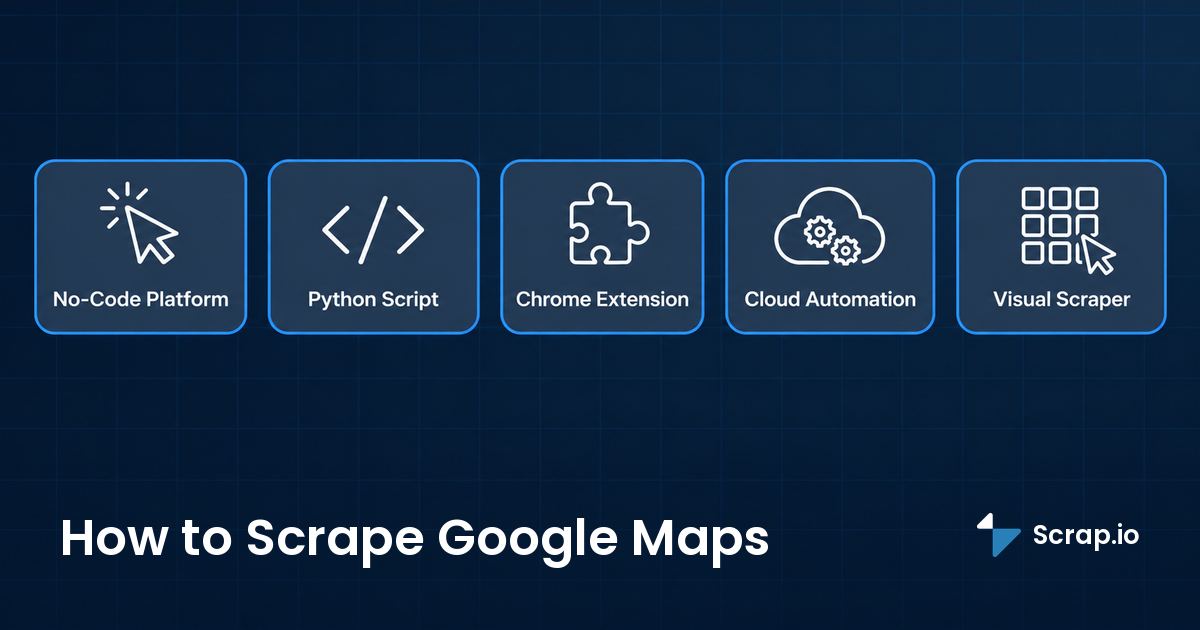
This guide covers five ways to pull that data, from writing your own Python scripts to no-code platforms like Scrap.io that handle the whole thing for you (free trial, 100 leads). I'll also get into what data you can actually extract, where the legal lines moved in 2026, who's doing this for real, and why the web scraping market now clears a billion and a half dollars. If you want the deep technical angle instead, we have a separate guide on the API and reviews-extraction side. This one is about the five methods, lead gen, and the legal picture.
Table of Contents
- What Is Google Maps Scraping?
- What Data Can You Extract from Google Maps?
- Why Google Maps Is the #1 Source for B2B Lead Generation
- Top 5 Google Maps Scraping Methods Compared
- Step-by-Step: How to Scrape Google Maps with Scrap.io
- Real Use Cases & Results
- The Web Scraping Market in 2026
- Is Google Maps Scraping Legal?
- FAQ
What Is Google Maps Scraping?
Google Maps scraping is using software to pull business information from Maps listings automatically, instead of clicking through them one by one: company name, phone, address, website, reviews, hours, all dropped into a spreadsheet you can actually work with. That's the whole concept, stripped of jargon. Sometimes people call it web scraping Google Maps or Google Maps data extraction. Same thing.
Who does it? Honestly, everyone at this point. Sales teams who need phone numbers and emails by the hundreds. Marketing agencies building prospect databases filtered by city, industry, star rating. Competitive-intelligence folks mapping how many rivals operate within a 20-mile radius. I know a real estate investor who scrapes it just to find commercial landlords.
And the market backs that up. The web scraping industry was valued at $1.56 billion in 2026 and is heading for $4.03 billion by 2032, a 17.08% CAGR over 2027 to 2032 (Mordor Intelligence, 2026). Separately, a BrowserCat survey found that 65% of enterprises were already feeding scraped web data into AI and machine-learning projects back in 2024. Not startups. Enterprises.
One thing upfront, though. Scraping public data doesn't make it a free-for-all. There are boundaries, and they shifted this year. I go deep on the legal stuff later.
What Data Can You Extract from Google Maps?
Two layers. And the gap between them is the gap between "nice spreadsheet" and "actual sales weapon."
Layer one is everything visible directly on the listing. Business name, phone, address, star rating, hours. Basic stuff any scraper can grab.
Layer two is where it gets good. Some tools don't stop at the listing, they also crawl the company's website (the one linked on the Maps profile) and pull enrichment data. Emails. Social accounts. The CMS they run on. Whether they're running ad pixels. That second layer is what turns scraped rows into leads you can actually act on.
Here's what each layer includes:
| Data Field | Where It Comes From |
|---|---|
| Company name & business type | Maps listing |
| Phone number + type (fixed / mobile / special) | Maps listing |
| Full address (street, city, ZIP, state, country) | Maps listing |
| GPS coordinates | Maps listing |
| Star rating & number of reviews | Maps listing |
| Operating hours | Maps listing |
| Photo count | Maps listing |
| Price range ($ to $$$$) | Maps listing |
| Maps URL, claimed status & first-seen date | Maps listing |
| Classified emails (main, individual with first/last name, contact, sales, marketing, finance, admin) | Website crawl |
| Social profiles (Facebook, Instagram, LinkedIn, TikTok, YouTube, X) | Website crawl |
| Website tech stack & CMS | Website crawl |
| Ad pixels (Meta Ads, Google Ads, LinkedIn) | Website crawl |
| Meta title, description, keywords | Website crawl |
| Contact form presence | Website crawl |
Notice the emails line in that table. It's not just "up to 5 addresses" dumped in a cell. A serious crawl classifies them: the main address, an individual email tied to a real first and last name, the generic contact@ one, plus sales, marketing, finance and admin inboxes. That's the difference between emailing info@ (where cold pitches go to die) and reaching the person who actually signs off.
Now think about that second column in practice. You scrape 500 restaurants in Chicago. You don't just know they exist, you know which ones run on Wix versus WordPress, which run Meta Ads, which list no email anywhere, which haven't even claimed their Google listing, and which ones just appeared on the map last month. That's not a contact list. That's a segmented pipeline.
Want to go deeper on emails specifically? Full walkthrough here: How to Find Email Addresses from Google Maps. For phone numbers, there's this separate guide.
Why Google Maps Is the #1 Source for B2B Lead Generation
I've tested a lot of lead sources over the years. LinkedIn, ZoomInfo, Apollo, manual prospecting. For local B2B, Google Maps beats all of them, and it's not close. Three reasons.
The sheer size of the database. 200 million-plus businesses. 4,000+ categories. 220+ countries. And here's the part people miss: the vast majority of those listings are small and medium businesses. The 8-person HVAC company. The solo accountant who just opened a second office. The family restaurant that's been around since 1994. If you sell B2B services, that's your whole market, and it's all on Maps. (Want the tactical version of turning listings into pipeline? See our guide on how to get local business leads with contact info.)
The people searching Maps are ready to buy. This stat from BrightLocal caught me off guard: 88% of consumers use Google Maps to find local businesses (BrightLocal/SeoProfy, 2026). Wild on its own. Then WiserReview (2025) found that 80% of those local searches turn into a physical visit within a day. These aren't browsers. They're people walking through doors. And businesses with a filled-out profile get 7x more clicks than incomplete ones (Google/Search Endurance, 2025). So the data you scrape maps almost directly onto real buying activity.
There's no login wall. Sounds minor. It changes everything. Google Maps is public: no account, no connection request, no profile to get flagged. Now try scraping LinkedIn at scale. You'll spend half your time spinning up backup accounts because the main one keeps getting suspended. Facebook, Instagram, same circus. Maps just doesn't have that problem.
Scale, buyer intent, open access. Put those three together and you've got the best source for Google Maps lead generation, full stop.
A number that reframes the whole thing
Let me make it concrete. We pulled the U.S. "Restaurant" category live from Scrap.io on November 2, 2026. There are 674,698 restaurants indexed on Google Maps in the United States. Of those, only 204,176 have a usable email, roughly 30%. And here's the one that should stop you cold: 225,636 of them have no website at all. Call it one in three.
Sit with that for a second. If you run a web design or marketing agency, that's 225,636 businesses in a single category that visibly need what you sell and aren't buying it yet. A prospect list with a built-in reason to call. And because Scrap.io lets you filter on "no website" before you export, you isolate exactly those businesses without burning a credit on the ones that already have a site. (We wrote the whole playbook on that: how to find local businesses without websites.)
Want an even sharper cut? There are 289,781 US restaurants that do have a website but no advertising pixel installed. Read that as: they have an online presence, they're clearly spending on something, and they're running zero retargeting. For an Ads agency, that's not a lead list. That's a to-do list.
Top 5 Google Maps Scraping Methods Compared
OK, practical part. Five methods, very different trade-offs. The quick version before the table:
- No-code platform (Scrap.io): easiest, scales to a whole country, returns emails.
- Python: total control, free-ish, breaks constantly, no emails out of the box.
- Chrome extensions: free and instant, capped small, surface data only.
- PhantomBuster: automation-friendly, billed by run time, no native emails.
- Octoparse: visual builder, decent for generalists, fiddly for Maps.
Now the detail. I made a comparison table because every time I explain this out loud, people's eyes glaze over by method three.
| Method | Difficulty | Cost | Scale | Emails? | Best For |
|---|---|---|---|---|---|
| No-Code (Scrap.io) | Easy | $$ | Country-level | ✅ | Sales teams, agencies |
| Python | Hard | Free to $ | Custom | ❌ (manual) | Developers |
| Chrome Extensions | Easy | Free | Limited | ❌ | Quick small jobs |
| PhantomBuster | Medium | $$$ | Medium | ❌ | Automation users |
| Octoparse | Medium | $$ | Medium | ❌ | Visual workflow fans |
There's a longer DIY vs professional scraper comparison if you want the full breakdown, and a ranked list of the 10 best Google Maps scrapers we tested.
Method 1: No-Code Platforms (Scrap.io)
I'll be honest, this is what I use 90% of the time, and I'm biased. But the reason is simple. I don't want to maintain code.
You go to Scrap.io, pick a business category from the 4,000+ mirrored off Google Maps, pick a location (country, state, city, whatever granularity you need), and it tells you exactly how many results match before you spend a cent. Hit export. CSV or Excel. That's the whole thing.
The data comes back in real time, not from some database that was scraped six months ago and is already half-stale. It's pulled fresh at export time from a live index of 225,676,406 business listings across 195 countries. And it includes enrichment: classified emails, social profiles, ad pixels, tech stack, the works. No proxies, no CAPTCHAs, no code. You can even drive the whole thing from an AI agent, because Scrap.io ships an official MCP connector for Claude, ChatGPT and Gemini, so you build a list in plain English.
New to this? Scrap.io runs on a free 7-day trial with 100 leads, enough to test a real market segment before you commit. Pick a category, pick a city, filter for the contacts you can actually reach (counting is always free), and judge the data quality yourself against 225M+ businesses in 195 countries. Start free on Scrap.io.
What About Just Asking an AI Agent?
You've seen the YouTube thumbnails. "One prompt in Claude Code gets you unlimited Google Maps leads." So we ran that exact prompt.
Target: restaurants in Charlotte, NC. We told an AI agent to go find them and pull emails, no data connector, just the model and a browser. It worked, sort of. It returned 102 rows and found an email for 41 of them, in 37 minutes. Not nothing. But not the "unlimited" the thumbnail promised either, and it quietly capped out the way every browser-driven scrape does.
Here's the thing people building these workflows keep rediscovering. One developer running LLM extraction at scale put it bluntly on Hacker News: "Using LLMs for web data extraction does not work unless you generate code." The model is a great orchestrator and a terrible scraper.
Which is exactly why the second run went differently. Same agent, same prompt, but this time connected to the Scrap.io MCP. Now the model wasn't extracting anything itself, it was calling a connector that queries a live index. Counts came back free, the "no email" filter applied before a single credit got spent, and the volume ceiling just vanished. The AI drives; the data layer does the work. If you want the full teardown, here's our guide on how to feed Google Maps data to AI agents, and connect the Scrap.io MCP and the counts are free.
Video: I Told an AI Agent to Scrape Google Maps. Then I Gave It Superpowers.
Method 2: Python Scraping
If you're a developer with needs no off-the-shelf tool covers, Python gives you full control. Selenium, Playwright, BeautifulSoup, Scrapy, the library ecosystem is huge.
Here's a stripped-down example so you can see the shape of it:
from selenium import webdriver
from selenium.webdriver.common.by import By

driver = webdriver.Chrome()
driver.get("https://www.google.com/maps/search/restaurants+nashville")
# scroll the sidebar, wait for elements to load...
results = driver.find_elements(By.CSS_SELECTOR, ".result-container")
for r in results:
    name = r.find_element(By.CSS_SELECTOR, ".title").text
    # extract phone, address, rating...
Looks elegant in a blog post. In reality? Google rewrites their Maps HTML every few weeks, so your selectors break constantly. You'll need proxy rotation. You'll need to handle JavaScript rendering. And you'll burn hours fixing things that worked fine yesterday.
The google maps-scraper github route
GitHub is full of open-source google maps scraper repos if you want a head start, and the google maps-scraper github crowd is genuinely active. The one everybody links to is gosom/google-maps-scraper, a fast Go project that ships a CLI, a web UI and a REST API, and it gets cited in Google's own AI Overview for the query. It's good. It's also still yours to maintain: proxies, rate limits, DOM breakage, and no reliable email extraction. Maintenance on these repos varies wildly. If you want the honest rundown of which ones survive real use, we tested them in our guide to open-source Google Maps scrapers on GitHub. And if code isn't your strength, there's a reason no-code alternatives took off.
Method 3: Chrome Extensions
Instant Data Scraper, Data Miner, G Maps Extractor. Free, fast, installed in ten seconds. For grabbing 50 listings for a quick research project, they're genuinely fine.
Beyond that? Problems stack up. You scrape on your own IP, so one block and your whole browser is toast. Google Maps caps a search at roughly 120 results (platform limit, not a tool bug). And most of these extensions do zero website enrichment. No emails, no social links, just surface listing data.
Worth a mention in this lane: Scrap.io's own free Chrome extension, "Emails and Social Networks for Google Maps," shows emails and social profiles right on the Maps interface as you browse, free and unlimited. It's a one-at-a-time tool rather than a bulk pipeline, but for on-the-fly prospecting it's a nice freebie. Full rundown of the category in our best Chrome extensions for Google Maps scraping guide.
Method 4: PhantomBuster
I've used PhantomBuster for LinkedIn automation and it's a legit product. For Google Maps scraping specifically, you feed in a URL, run their pre-built Phantom, and get a CSV.
My gripe is the billing model. You pay for slots, execution hours and credits, not for useful data delivered. Current pricing runs $69/month for Start, $159 for Grow, $439 for Scale (drop to $56 / $128 / $352 on annual), and hours don't roll over (Valley, October 2026). So your Phantom runs 40 minutes and returns 300 clean leads? Great. It runs 40 minutes, something trips, you get 15 garbage rows? Same clock, same cost. Oh, and the trial caps CSV exports at 10 rows, which is barely a taste. That unpredictability gets old fast when you're budgeting client campaigns. Here's the head-to-head:
Video: PhantomBuster vs Scrap.io in 2026: Great Tool, Wrong Job
The execution-time vs lead-based pricing comparison has the actual math, and there's a broader PhantomBuster alternative overview too.
Method 5: Octoparse
Visual scraping tool with a drag-and-drop builder. The pitch: non-developers build scraping workflows without code. For some websites, that genuinely works.
For Google Maps? Hit or miss. You either build a workflow from scratch (which means understanding XPath, regex and loop logic) or you use one of their templates, which are easier but rigid and don't always grab the right fields. No email extraction. No social media. Just what's on the page.
If you're already in the Octoparse ecosystem, maybe worth a shot. Otherwise the Octoparse vs Scrap.io comparison lays out the differences cleanly.
Step-by-Step: How to Scrape Google Maps with Scrap.io
Alright, let me walk through it, because the process to scrape data from Google Maps here is genuinely short. If you'd rather watch than read, here's the two-minute onboarding:
Video: Scrap.io: How to Start
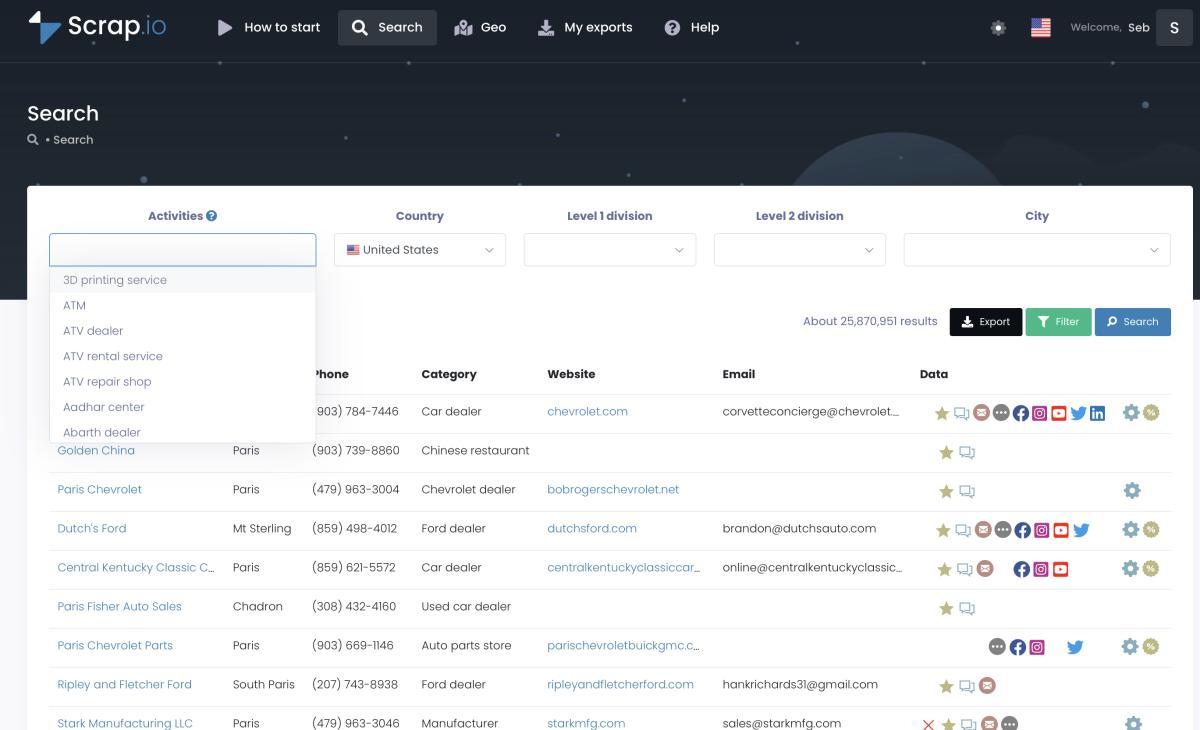
Step 1: search. Open the Search tab. Two dropdowns, category and location. The categories mirror Google Maps directly (4,000+ of them). The smallest administrative level is the city, so for anything tighter than a city, a neighborhood or a custom trade area, you switch to GeoSearch (a radius around a point, or a polygon you draw by hand). Pick "Plumber" and "Tennessee" and you're ready.
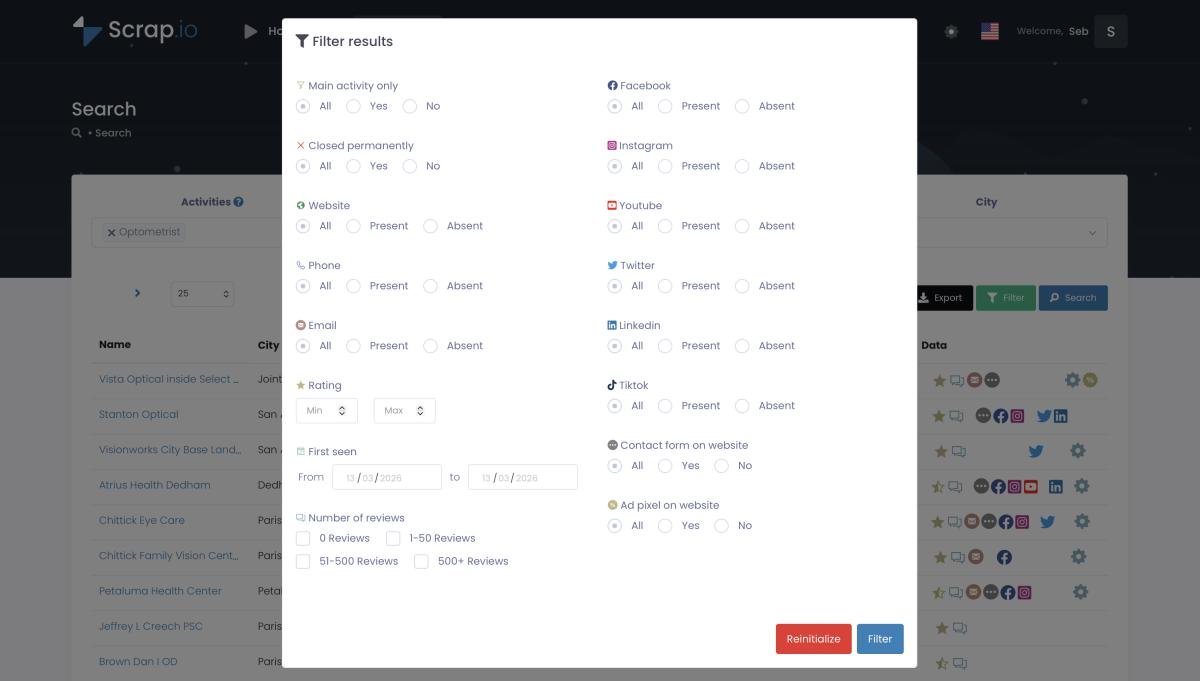
Step 2: filter before you pay. This is my favorite part, because most Google Maps scraping tools make you export everything first and then sort through the mess. Scrap.io filters beforehand: only businesses with a website, only ones with an email, only claimed listings, minimum rating, minimum reviews, specific social networks, price range, even whether they run a contact form or ad pixels. There's also a first-seen-date filter for businesses that just appeared on the map, and automatic exclusion of contacts you already exported, so zero duplicates across campaigns.
Quick example of why that matters. Say you sell Facebook Ads management. Filter for businesses that have a website but no Meta ad pixel. That's not a lead list, that's a list of companies who literally need what you sell and aren't buying it yet. That level of targeting before you even open the file is almost unfair.
More on the advanced filtering options here.
Step 3: export. Scrap.io shows the exact count of matching results before you commit (counting is free, it never costs a credit). Choose how many rows, name your file, CSV or Excel, pick your columns. Done in seconds.
Here's a simplified version of what the export looks like:
| Company | Type | Phone | City | Rating | FB Ads | |
|---|---|---|---|---|---|---|
| Joe's Plumbing | Plumber | (615) 555-0142 | [email protected] | Nashville | 4.6 | No |
| Elite HVAC | HVAC | (615) 555-0198 | [email protected] | Nashville | 4.2 | Yes |
| Carter Roofing | Roofing | (615) 555-0233 | no email | Nashville | 3.9 | No |
| GreenLeaf Landscaping | Landscaper | (615) 555-0311 | [email protected] | Nashville | 4.8 | Yes |
| Quick Fix Electric | Electrician | (615) 555-0087 | [email protected] | Nashville | 4.4 | No |
The actual file has 40+ columns: social links, SEO data, ad pixels, GPS coordinates, working hours, everything. I trimmed this for readability.
Want to try it on your own market? Grab 100 free business leads from your target industry on Scrap.io: 225M+ businesses across 195 countries, filtered before you spend a single credit, with real-time data pulled at export.
From there you can push the data straight into your CRM or go full no-code and build an automated prospecting pipeline with Make.com. Topic for another day.
Google Maps Scraping: Real Use Cases & Results
Scraping guides that stay theoretical annoy me. "You can use it for lead gen!" Great. Who actually did, and what happened? Here's what I've seen.
Outscraper's user reviews are public and they tell a clear story. On Outscraper's Capterra and Trustpilot pages you'll find people documenting pulls of 120,000+ data points in a single year for market research. Not a handful of power users. Thousands of people scrape Maps data daily through their platform alone. (Full disclosure: literal review quotes shift over time, so I'm pointing you at the source rather than freezing a line here. Go read the recent ones.)
There's a r/Entrepreneur thread that's basically legendary at this point. It ranks on page one of Google for "Google Maps scraping," which tells you how hard it resonated. People trading notes on what they tried, what broke, what delivered leads, what they spent. One founder in that thread, who built his own tool, summed up the DIY trap in one line: "I have built my own google maps scraper to get business details from Google maps API but it is really expensive to run." That's the recurring pattern. Everyone starts free or homemade, everyone hits the ceiling, and the ones burned by time-based billing are very vocal about it.
Lead-gen agencies have built whole business models on this. A common documented workflow: scrape Maps listings for a city and category, filter for businesses with a website but no listed email, then pitch them email marketing or web design. One nicely targeted play I came across: restaurants in mid-size US cities, rating between 3.5 and 4.2, website present, no Meta ad pixel. A business with customers but no digital marketing yet. That's a warm lead.
And then there's Apify. Their Google Maps scraper actor sits at 4.7 across 1,820 reviews, with 669K total users (46K active monthly), from $1.50 per 1,000 places (Apify, 2026). That volume alone tells you demand for Google Maps data extraction is growing, not shrinking.
For head-to-head tool comparisons: Outscraper vs Scrap.io and Bright Data vs Scrap.io.
The Web Scraping Market in 2026: Scale & Trends
Some people still think Google Maps scraping is a niche hacker thing. It's not. It's a billion-dollar industry with institutional buyers, so here's the context.
Global web scraping market: $1.56 billion in 2026, on track for $4.03 billion by 2032 at a 17.08% CAGR across 2027 to 2032 (Mordor Intelligence, 2026). The growth comes from three places. Competitive-intelligence budgets that keep climbing. The explosion in demand for AI and ML training data. And B2B lead generation, the use case you're probably here for.
The Google Maps numbers are frankly absurd when you stack them. 200 million+ businesses listed (Google/Loopex Digital, 2024). 2 billion monthly active users (SQ Magazine, 2025). 88% of consumers find local businesses through Maps (BrightLocal/SeoProfy, 2026). 80% of local searches convert to an in-store visit within 24 hours (WiserReview, 2025). Complete profiles get 7x more clicks than empty ones (Google/Search Endurance, 2025). And businesses that link their site from their Google profile see about a 23% lift in organic traffic (SQ Magazine).
On the enterprise side, 65% of companies used scraped web data for AI projects back in 2024 (BrowserCat, 2024). Not "considered." Not "piloted." Used. The pipeline from scraping to machine-learning model is basically standard infrastructure now.
Want the economics of Google Maps API costs vs dedicated scraping platforms? That comparison covers it in depth.
Is Google Maps Scraping Legal? Complete Compliance Guide
Can you legally scrape Google Maps? For public business data, broadly yes. The usage is where the nuance lives, and in 2026 one court decision made the whole conversation more interesting. Let me be specific.
Public Data Doctrine
In the US there's real precedent. hiQ Labs v. LinkedIn went through the Ninth Circuit. LinkedIn argued scraping its public profiles violated the Computer Fraud and Abuse Act. The court disagreed. The Supreme Court declined to take LinkedIn's appeal. The interesting part: LinkedIn profiles are semi-public, you need an account to see them. Google Maps data is fully public. No account, no login, nothing between you and the listing. If scraping semi-gated data is legal, scraping fully public data stands on even firmer ground.
Google v. SerpApi (2026): What Changed
For years, "Google's ToS says no" was the end of the conversation. In July 2026, a federal judge complicated that.
Google had sued SerpApi in December 2025 under the DMCA Section 1201, arguing SerpApi circumvented an anti-bot barrier Google calls "SearchGuard." Judge Yvonne Gonzalez Rogers granted SerpApi's motion to dismiss. The claims covering plain and aggregated search results were tossed without leave to amend, because those results are publicly accessible facts, not works protected under the Copyright Act. The claims touching third-party content (knowledge panels) were dismissed with 21 days to amend, since Google would have to show the actual rights-holders authorized it to deploy access controls on their behalf. Sources: Search Engine Roundtable.
Here's the catch that matters for scrapers, though. The judge also agreed that spoofing browser fingerprints, rotating IPs and solving CAPTCHAs to get past SearchGuard counts as "circumvention" under the DMCA. Circumvention on its own isn't illegal, it's only actionable when the barrier guards copyrighted works with the rights-holders' permission. So professional tools that rotate IPs aren't automatically in the clear the way earlier guides implied.
Two honest caveats. This is a first-instance decision about Google Search, not Maps. And the next move (Google's amendment or an appeal) wasn't confirmed as of November 2, 2026. Which is the whole reason the "talk to a lawyer" line below still stands.
Google's Terms of Service
Yes, technically Google's ToS prohibit automated access to their services. I won't pretend otherwise.
But the other side of that coin: Google's entire search engine, the thing that made them one of the most valuable companies on Earth, works by automatically scraping everyone else's websites. Every day. At massive scale. So the "no automated collection" clause has always been a little philosophically inconsistent.
In practice, millions of businesses and individuals use Google Maps scraping tools without legal consequences. The ones who get in trouble are doing reckless things: hundreds of thousands of requests a second, deliberately overloading servers. Professional tools manage request rates and stay within reasonable boundaries. Worth knowing, post-SerpApi: a ToS breach is a contract matter, not a criminal one, and the realistic worst case for sensible use is a temporary IP block, not a courtroom.
Privacy Regulations by Region
GDPR (EU): the distinction most people confuse is personal vs business data. A company name, business address, business phone, website, that's business information, not personal data. If a specific person's name and personal email show up in a scrape, then yes, GDPR handling kicks in. Standard business listing data from Maps? Not personal data in most readings.
CCPA (California): same principle, applied differently. Publicly available business information is carved out of CCPA's scope. You're scraping commercial data, not individual consumer profiles.
CAN-SPAM: this governs what happens after you scrape, not the scraping. Email a business contact you got from Maps and the usual rules apply: unsubscribe link, real sender info, physical address. No different from a business card you grabbed at a conference.
Best Practices for Compliant Scraping
Keep it simple. Only scrape data that's publicly visible to any browser visitor. Don't go behind login walls. Use professional tools that handle rate limiting. Skip anything that looks like personal data unless you know the rules for your jurisdiction. And if you're in a gray area or have real money at stake, talk to an actual lawyer, not a blog post.
Full legal breakdown: Is It Allowed to Scrape Google Maps?
| Region | Regulation | Key Rule | Business Data | Personal Data |
|---|---|---|---|---|
| United States | First Amendment / CFAA | Public data broadly protected (hiQ v. LinkedIn) | ✅ Allowed | ⚠️ Depends on context |
| European Union | GDPR | Business data ≠ personal data in most cases | ✅ Allowed | ❌ Strict rules |
| California | CCPA | Public business info excluded from scope | ✅ Allowed | ⚠️ Opt-out needed |
| Global | CAN-SPAM / ePrivacy | Rules apply to email usage, not collection | ✅ Collection OK | ⚠️ Usage rules |
Frequently Asked Questions
How much does Google Maps scraping cost?
All over the map (no pun intended). Python is technically free, but your dev's time isn't. Chrome extensions cost nothing but cap at roughly 120 results. PhantomBuster runs $69 to $439/month and bills by slots and execution time regardless of results, with trial exports capped at 10 rows, which can burn you. Scrap.io charges per lead: a free 7-day trial gives you up to 50 searches and 100 export credits (a card is required to activate), and paid plans run $35/month for 10,000 credits (Basic) up to $350/month for 100,000 credits (Company), on annual billing. One credit equals one exported business, counted once per 30-day window. The cost comparison between billing models is worth a read if budget matters.
What is the best free Google Maps scraper?
For tiny jobs, a free Chrome extension (Instant Data Scraper, or Scrap.io's free "Emails and Social Networks for Google Maps" extension) works fine. Open-source projects like gosom/google-maps-scraper are free too, but they need setup, proxies and maintenance. For volume and emails, a 7-day Scrap.io trial gives you 100 export credits to test real bulk extraction without committing.
How do I export a Google Maps list as CSV?
Four steps:
- Search a category and a location (for example "plumber" + "Tennessee").
- Apply your filters (has email, has phone, rating, no website, whatever you need).
- Check the free count to see how many businesses match before spending a credit.
- Export to CSV or Excel and pick your columns. Done.
Can you scrape Google Maps without coding?
That's literally why Scrap.io exists. Two dropdowns (category and location), a few filters, an export button. No code, no command line, no API keys. Chrome extensions also work for tiny jobs, with very limited data. Full guide: Scrape Google Maps Without Python.
How do I scrape Google Maps for free?
Free Chrome extensions like Instant Data Scraper pull basic listing data (names, addresses, ratings), but no emails. Building a Python scraper with open-source libraries is free too, and will eat your weekends. Scrap.io gives you 100 google maps scraper free leads on a trial, enough to test a real market segment without committing.
Is there a Google Maps API for scraping?
There's the official Places API. It works, but it's limited: a maximum of 60 results per query (20 per page, three pages), and no email or social data whatsoever. Pricing in 2026 runs about $32 per 1,000 for Text Search Pro (with 5,000 free calls a month), $35 for Enterprise and $40 for Enterprise plus Atmosphere; the old $200 monthly credit was replaced by per-SKU free thresholds on March 1, 2025. For one-off lookups it's fine. For google maps data extraction at scale, dedicated platforms are both cheaper and more capable, and there's a dedicated Google Maps API alternative breakdown with code examples.
What is the best Google Maps scraper?
Depends what you're optimizing for. Full technical control? Python with Selenium. A quick one-time scrape? Chrome extension. Scale, emails, pre-export filtering, no code? Scrap.io. The comparison table earlier in this article breaks it down by difficulty, cost, scale and features, and we ranked the 10 best scrapers we tested too.
Can you scrape Google Maps reviews?
Review counts and star ratings? Easily. Per-star breakdowns (how many 5-stars vs 1-stars)? Yes, most tools handle that. Individual review text? Possible with some tools, but tread carefully, review content can contain personal info, and that's where you start bumping into ToS boundaries.
Is it possible to scrape an entire country?
Yes. With a purpose-built google map extractor, you pull every listing for a category across a whole country: every dentist in the UK, every restaurant in France, every plumber in the US. Scrap.io does this natively because it runs on its own index of 225,676,406 listings across 195 countries, so it isn't capped by Google's ~120-results-per-search limit. One real client extraction: 11,734 businesses in 45 minutes. That scale is the main dividing line between purpose-built Maps tools and generic scrapers that choke past a few hundred results. Here's what a country-level pull looks like:
Video: How to Scrape Local Leads at the Country Level
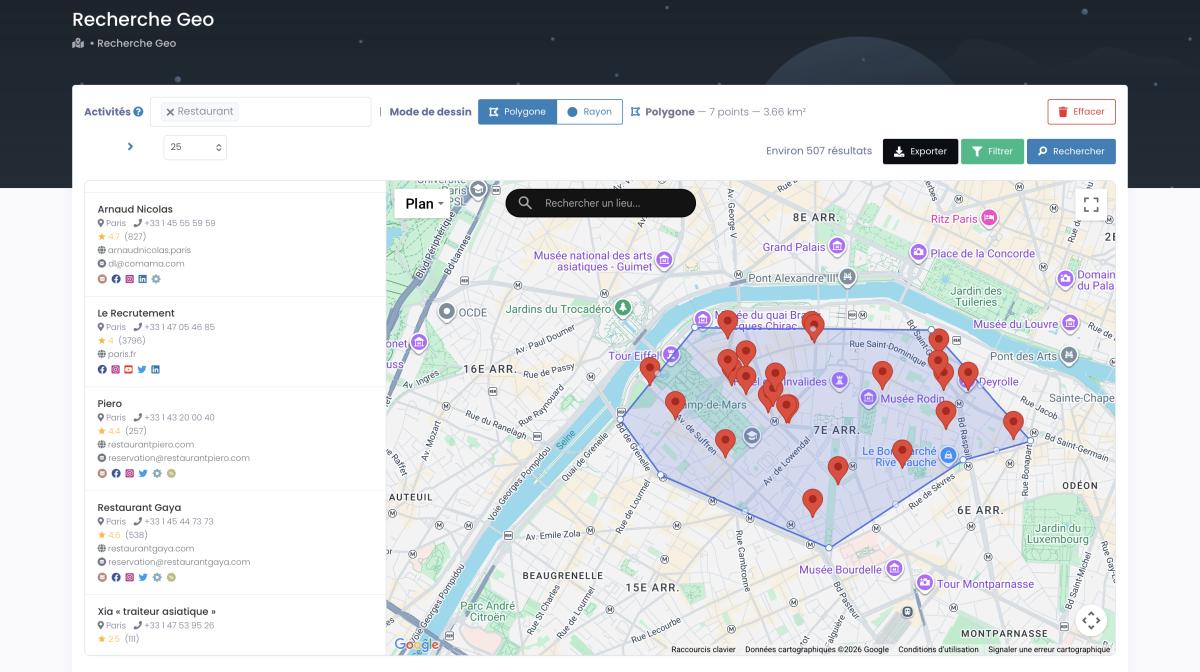
For service areas that don't match a city or state, there's GeoSearch: draw a radius around a point, or trace a polygon by hand around a neighborhood, and every filter still applies inside the shape.
What data can you extract from Google Maps?
Base layer: business name, address, phone (with fixed/mobile/special type), website, hours, star rating, reviews, photos, GPS coordinates, first-seen date. With enrichment: classified emails, social profiles, website technologies, ad pixels, contact forms, SEO metadata. Scroll up to the data fields table for the full breakdown.
Ready to turn Google Maps into a lead generation machine? Try Scrap.io free, 7 days, 100 business leads. Pick any category, any of 195 countries, filter for the contacts you can actually reach (counting is free), and export a ready-to-use list in a couple of clicks.
Generate a list of restaurant with Scrap.io